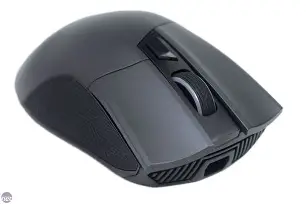
Rog Gladius II Wireless Specs, Features, and Value: Is It Worth the Price Tag?
Introduction
Wireless gaming mice have come a long way—many now rival their wired counterparts in latency and reliability. Among the standout contenders is the Rog Gladius II Wireless, a highly regarded mouse from Asus’s Republic of Gamers (ROG) lineup. It promises the precision, comfort, and customizability that competitive gamers and discerning PC enthusiasts expect. But with a premium price tag, is this mouse truly a valuable investment? This in-depth review dissects the Rog Gladius II Wireless, exploring its specs, features, real-world usability, and overall value to help potential buyers make an informed choice.
Overview: Rog Gladius II Wireless at a Glance
Launched as a wireless evolution of the popular Gladius series, the Rog Gladius II Wireless aims to bridge high performance and versatility. It packs advanced wireless technology, precise sensor hardware, and an ergonomic design known throughout the ROG family. Whether used for fast-paced FPS titles, productivity, or daily digital life, it strives to accommodate a wide range of users.
Main Technical Specifications
- Connectivity: Dual wireless (2.4GHz RF / Bluetooth), USB wired
- Sensor: Optical sensor, up to 16,000 DPI (PixArt PMW3389)
- Polling Rate: 1000 Hz (wired/2.4GHz), lower rates on Bluetooth
- Battery Life: Up to 24 hours with lighting on, up to 36 hours with lighting off (2.4GHz)
- Weight: Approx. 130g
- Buttons: 7 programmable buttons (including DPI switch and side buttons)
- Switches: ROG exclusive push-fit socket design – Omron switches
- RGB Lighting: ASUS Aura Sync compatible (scroll wheel, logo, underglow)
- Software: Armoury II customization support
- Compatibility: Windows, Mac OS (limited), most Linux (basic support)
Detailed Review: Features, Performance & Experience
Design & Build Quality
From the moment it’s unboxed, the Rog Gladius II Wireless radiates a premium feel. Its right-handed, ergonomic shape supports palm and claw grips, with subtle grooves for thumb comfort and finger support. The mouse’s surface is finished with a matte plastic that resists fingerprints fairly well—a detail many users appreciate during marathon sessions.
Side grips are rubberized with a Mayan-inspired pattern, providing pleasant tactility and preventing slips during intense use. Weighing in at around 130 grams, it's not the lightest wireless gaming mouse in the segment, but those who prefer a solid, substantial hand-feel will appreciate the heft. It’s robust without being overbearing.
Connectivity Options
A key selling point is connectivity versatility. The Gladius II Wireless offers three modes: ultra-fast 2.4GHz RF, Bluetooth 4.2 for universal pairing, and USB wired mode for charging or uninterrupted play. The 2.4GHz connection is notably reliable for gaming, with virtually undetectable input lag. Bluetooth mode is handy for productivity tasks or pairing with laptops and tablets but exhibits a slight latency increase—common for most Bluetooth peripherals.
Switching between modes is seamless, thanks to a toggle on the mouse’s underside. The provided USB dongle has a neat housing under the mouse for portability.
Discover deals on Electronics — updated daily.
View Offers →Performance & Sensor Accuracy
Powered by a PixArt PMW3389 optical sensor, the Gladius II Wireless delivers up to 16,000 adjustable DPI and tracks at 400 IPS (inches per second). In real-world gaming, cursor movement is consistent and crisp, with no signs of acceleration or smoothing—even at high speeds. This makes it trusted by FPS and competitive titles where micro-adjustments and flicks decide outcomes.
The mouse feet glide smoothly on hard and fabric pads, and lift-off distance is adequately low—another necessity for FPS gamers. Coupled with the 1000 Hz polling rate in both wired and 2.4GHz wireless modes, aim feels snappy and precise. The option to bring DPI down for scoped sniper shots or crank it up for rapid RTS navigation is easy, thanks to a well-placed DPI switch.
Buttons & Customizability
Seven programmable buttons—left, right, scroll wheel, two side buttons, DPI switch, and one additional function button—grant…Unique to ROG, the Gladius II Wireless sports a push-fit socket switch design. This allows users to hot-swap the main left and right button Omron switches, extending the mouse’s lifespan and allowing for personalized tactility preferences (extra switches included in the box).
With Asus Armoury II software, users can remap buttons, customize DPI, polling rate, lighting, and set up profiles. While the software’s interface is utilitarian, it is comprehensive and gets the job done.
RGB Lighting & Aesthetics
For those who appreciate desk aesthetics, the mouse features three-zone RGB lighting—logo, scroll wheel, underglow—all compatible with Asus’s Aura Sync. Effects range from pulsing single colors to rainbow cycling and can be coordinated with other ROG hardware for a consistent look.
Find top-rated Electronics products at great prices.
Browse Now →Battery Life & Charging
Battery endurance ranges from 24 hours (with RGB lighting on) to 36 hours (with lighting off) in 2.4GHz mode. While this is sufficient for several gaming sessions, it falls slightly short of ultralight competitors in terms of stamina, which can sometimes last for 50+ hours per charge. Wired play and quick charging via the included USB cable alleviate concerns during long gaming weekends.
Pros and Cons
- Pros
- Excellent sensor accuracy and low-latency 2.4GHz performance
- Ergonomic, comfortable design for right-handed users
- Hot-swappable Omron main switches (durability and customization)
- Versatile connectivity: 2.4GHz, Bluetooth, USB wired
- Comprehensive software customization via Armoury II
- Premium build quality and textured side grips
- Aura Sync-compatible RGB for aesthetic setups
- Cons
- Heavier than much of the competition (130g)
- Battery life is decent but not class-leading
- Right-handed design excludes left-handed users
- Premium pricing—comparable wireless mice sometimes cost less
- Bluetooth mode adds input lag (not ideal for competitive gaming)
Comparison Table: Key Rivals vs. Rog Gladius II Wireless
| Feature | Rog Gladius II Wireless | Logitech G Pro X Superlight | Razer Viper Ultimate | Corsair Dark Core RGB Pro |
|---|---|---|---|---|
| Sensor | PixArt PMW3389 16,000 DPI | Hero 25K 25,600 DPI | Focus+ Optical 20,000 DPI | PixArt PAW3392 18,000 DPI |
| Weight | 130g | ~63g | 74g | 133g |
| Wireless Modes | 2.4GHz RF, Bluetooth, Wired | 2.4GHz RF, Wired | 2.4GHz RF, Wired | 2.4GHz RF, Wired, Bluetooth |
| Battery Life (no RGB) | ~36 hrs | ~70 hrs | ~70 hrs | ~50 hrs |
| RGB Sync | Aura Sync | None | Razer Chroma | iCUE |
| Button Switches | Hot-swappable Omron | Standard | Standard (Optical) | Standard |
| Price Range | Upper-Mid | High | High | Mid |
Buying Guide: How to Pick the Right Wireless Gaming Mouse
For gamers, designers, and productivity-focused professionals, choosing the right wireless mouse is more than just picking a device with the highest DPI. Here are key factors to evaluate:
- Performance & Accuracy: Prioritize sensor quality, polling rate, and tracking accuracy. For competitive gaming, low latency and precise tracking (without acceleration) are essential.
- Ergonomics & Comfort: Assess grip shape (palm, claw, fingertip). Heavier mice may offer stability, while lightweight options improve speed and reduce fatigue. Make sure to select based on your hand size and grip style.
- Connectivity: Dual or triple-mode mice (2.4GHz, Bluetooth, wired) offer versatility for gaming and mobile productivity. Check for a reliable, low-latency wireless protocol, especially if you game often.
- Battery Life: Long battery life reduces downtime. If you're often on the move, mice offering 50+ hours per charge (with lighting off) let you worry less about recharging.
- Customization: DPI presets, programmable buttons, and software support let you tailor your mouse to task or game type. Hot-swappable switches are a bonus for durability and maintenance.
- Build Quality: Look for robust materials, quality switches, and non-slip side grips. Consider the cord quality if you often switch to wired mode.
- RGB & Aesthetics: RGB isn’t for everyone, but if you want your setup to coordinate, make sure your mouse supports your RGB ecosystem.
- Price-to-Value Ratio: The most expensive mouse isn’t always the best for you. Factor in durability, features, and brand after-sales support when weighing value.
Conclusion: Is the Rog Gladius II Wireless Worth the Price?
The Rog Gladius II Wireless stands out for its excellent sensor performance, robust build, ergonomic comfort for right-handed users, and rare hot-swappable switch feature. Its versatile connectivity options and comprehensive customization make it suitable for both gamers and professionals who juggle between gaming, office work, and mobile devices. While it is heavier and less enduring per charge than some ultra-light rivals, its solidity and adaptability appeal to those who value a substantial, feature-rich device.
The main caveats are its relatively higher weight and price-to-battery ratio. For users prioritizing lightweight designs for twitch shooters, the Gladius II Wireless may not be the prime candidate compared to featherweight competitors. However, for those who value durability, switch customizability, and the ROG design DNA—plus strong wireless performance—the mouse offers considerable value, especially during sales or bundle deals. Ultimately, the Rog Gladius II Wireless is well-suited to gamers and PC enthusiasts who want a premium, reliable mouse that can flexibly serve in both competitive play and everyday computing, justifying its place among the upper echelons of wireless gaming mice.